
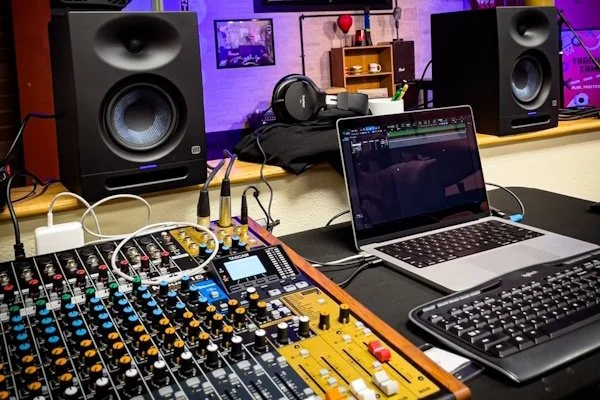
Recording Studio Lab
Ever wanted to learn how to professionally record yourself or others?
Taught by Phil Sheeran, this course teaches the fundamental concepts of recording theory and how to use a Digital Audio Workstation (DAW) using industry-standard Avid Pro Tools.
What You Will Learn
Over the course of the lab, students will work on hands-on class projects and home assignments covering:
Studio Basics: Signal flow, microphone techniques, and gain staging
Tracking & Editing: Overdubbing, "punching in," and in-depth vocal and track editing
Mixing & FX: Equalization (EQ), compression, and mixing fundamentals
Modern Media: Introduction to "Podcast" style recording, and syncing professional audio for YouTube or TikTok
Final Capstone Project: Bring your passion project to life! Options include producing your own song, hip-hop beat, podcast, music video audio, or Foley sound effects.
What to Bring
To fully participate in class activities and complete assignments, students must bring the following:
Laptop Computer
Avid Pro Tools Software(AVID Pro Tools Intro or greater.)
-
System & Hardware Requirements
Core Requirements (Mac & Windows):
RAM: 16GB minimum (32GB or more recommended)
Storage: At least 15GB of free disk space for installation. A separate, fast external SSD (formatted APFS/HFS+ for Mac or NTFS for Windows) is recommended for saving audio files.
Authorization: A free iLok account is required for software activation (iLok Cloud, or an iLok 2/3 USB key).
Internet Connection: Required for software installation and activation.
Mac Requirements:
Processor: Intel Dual Core i5 or faster, or Apple Silicon (M1, M2, M3, M4)
Operating System: macOS 14.7.x (Sonoma), 15.7.x (Sequoia), or later
Windows Requirements:
Processor: Intel Core i5 or greater
Operating System: Windows 10 or Windows 11 (with updated NVIDIA drivers)
💡 Unsure about your computer setup? Check out Avid’s Home Recording Studio Guide.ere
-
Q: Can I bring my own headphones to class?
A: Yes! If you have wired, over-ear headphones, you are welcome to bring them. We do not recommend Bluetooth or wireless earbuds, as wireless latency causes audio delays that make precise editing difficult.
Q: Can I bring my own audio interface to class?
A: Each student workstation is already fully equipped with an audio interface and headphones for in-class projects. To ensure a smooth, uniform setup for instruction, we ask that all students use the provided studio interfaces during class.
-
Contact us HERE.
Class Time and Dates (choose one):
Saturdays
Oct 10, 17, 24, 31, Nov 7, 14, 21, Dec 5
12:00-1:00pm
Location:
Desert Hills Presbyterian Church
(in The Recording Lab)
34605 N. Tom Darlington Rd.
Scottsdale, AZ 85266.
Participation Fee: $250
Recording Studio Lab Registration Form
Special thanks to the Kiwanis Club of Carefree for their generous grant funding the
state-of-the-art equipment for our Recording Studio Lab.